
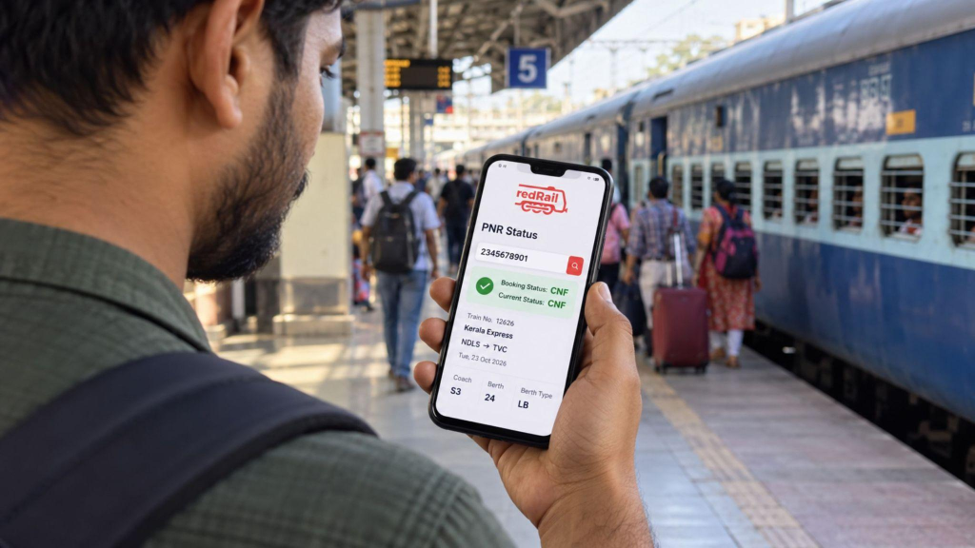
Planning a train journey involves more than booking a ticket. You need to know whether your seat is confirmed before arranging accommodation, local transport or other activities. This becomes especially important when your ticket is on the waiting list.
An online PNR enquiry helps you check your reservation details and understand whether you can travel as planned. You can also use train booking platforms to check alternative trains, seat availability and running information before finalising your arrangements.
What Is PNR Status and Why Should You Check It?
PNR status tells you the current position of your reserved train ticket. PNR stands for Passenger Name Record. It is a unique ten-digit number generated when you book a reserved railway ticket.
Checking this information helps you:
- Find out whether your ticket is confirmed, RAC or waitlisted.
- Check the reservation position of everyone on your ticket.
- View available coach and berth details.
- Track changes in your reservation before departure.
- Decide whether you need an alternative travel arrangement.
Your booking position may change before the reservation chart is prepared, so checking it again closer to departure is useful.
How to Check Your Train Ticket Status Online
You can check your reservation through an online railway enquiry service or train booking platform. The process is simple and does not require complicated steps.
- Open a trusted railway enquiry website or app.
- Look for the PNR enquiry section.
- Enter the ten-digit number mentioned on your ticket.
- Click the button to check your current reservation.
- Review the details displayed on the screen.
You can usually view your train number, journey date, boarding station and current ticket position together.
Understanding Your PNR Status Code
The result of your enquiry will usually show one of three positions:
- CNF (Confirmed): Your berth is reserved and you can travel as planned.
- RAC (Reservation Against Cancellation): You can board the train and share a berth, with a chance of getting a full berth if others cancel.
- WL (Waitlisted): You do not have a seat yet. Your ticket will be confirmed only if enough passengers ahead of you cancel.
If your ticket shows CNF, you can go ahead with your plans. If it shows WL, or your position has barely moved as the journey date approaches, it is worth looking at your options now rather than waiting until the chart is prepared.
redRail Confirm: Find Alternative Seats When Your PNR Is Waitlisted
If your ticket remains waitlisted, you can explore other available booking options instead of depending entirely on confirmation. The redRail Confirm feature helps you find alternative booking routes that may offer available seats on your preferred train. Check the suggested options, boarding details and seat availability before making another reservation.
Confirm or 3X Refund: A Backup Option for Unconfirmed Tickets
A waitlisted reservation can make it difficult to finalise your journey. For bookings with the eligible paid Confirm or 3X Refund feature, you can receive a 3X refund benefit if every passenger on your PNR remains waitlisted after chart preparation. The benefit includes a ticket fare refund and a travel voucher, subject to applicable conditions. This can help you arrange alternative travel when your original ticket does not get confirmed.
Free Cancellation: Keep Your Travel Plans Flexible
If your journey dates are uncertain, cancellation flexibility can be useful when booking another train. For eligible bookings with the Free Cancellation add-on, you can cancel within the permitted period without standard railway ticket cancellation charges. The eligible ticket fare is refunded, while certain booking and add-on fees remain non-refundable. Check the cancellation deadline and refund conditions before booking.
Easy Login With Your IRCTC User ID: Book Alternative Train Tickets
If your PNR enquiry shows that your ticket is still waitlisted, you can check other trains and complete a new reservation using your existing IRCTC user ID. Online railway ticket booking platforms let you view seat availability, enter passenger details and complete the booking without visiting a railway reservation counter. Make sure you review the new ticket details before payment.
Offers and Coupon Codes: Save on Your Next Train Booking
When booking an alternative train, you can check whether any offers or coupon codes are available. Some online railway booking platforms provide discounts on eligible tickets through promotional codes. Before completing your booking, check the offer conditions, eligible routes, payment requirements and validity. This helps you understand the final payable amount before confirming your new reservation.
Conclusion
Checking your train reservation before travelling helps you avoid uncertainty about your seat and journey arrangements. Start by entering your PNR number, understanding your reservation code and reviewing the latest status before departure. If your ticket remains waitlisted, check alternative trains and available booking features.
You should also review cancellation conditions and live running information separately. With these details available online, you can make practical travel decisions without depending on outdated booking information or making unnecessary last-minute arrangements.