
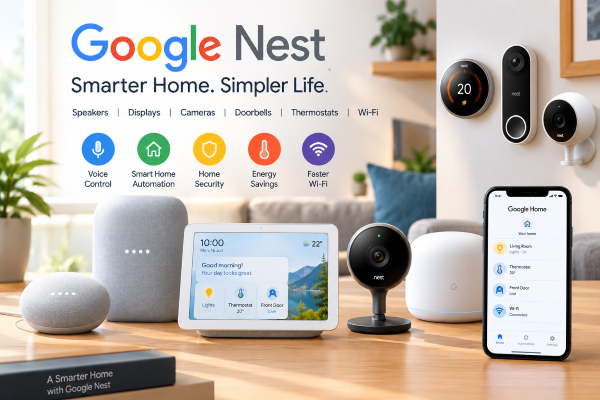
Smart home technology has changed the way people interact with their homes. From controlling lights with a voice command to checking a camera feed from a smartphone, connected devices can make everyday tasks more convenient. Google Nest is one of the better-known smart home ecosystems, bringing together speakers, displays, cameras, doorbells, thermostats, Wi-Fi products and other connected devices.
Google’s current connected-home lineup includes products under both the Google Home and Google Nest names. The ecosystem is managed largely through the Google Home app, which allows users to organize devices, create automations and control compatible smart-home products.
What Is Google Nest?
Google Nest is a family of smart home products developed by Google. The range originally became well known for smart speakers and thermostats, but it has expanded into home security, entertainment, connectivity and home automation.
Nest products are designed to work together through Google’s smart-home software. Depending on the product, users can control devices through the Google Home app, Nest app, voice commands or compatible Google devices.
The ecosystem includes products such as Nest speakers, Nest Hub displays, Nest cameras, Nest Doorbells, Nest thermostats, Nest Protect smoke and carbon monoxide alarms and Nest Wi-Fi products.
Google Nest Speakers
One of the simplest ways to enter the Google smart-home ecosystem is through a smart speaker.
The Google Nest Mini is a compact speaker designed for voice commands, music and basic smart-home controls. Users can ask Google for information, set alarms and timers, check weather, manage reminders and control compatible devices.
The Nest Audio is designed for people who want a larger speaker with stronger sound. Google describes it as offering clear vocals and powerful bass, while also allowing users to control music and other connected devices with voice commands.
Google’s newer Google Home Speaker (2026) is also part of the company’s current connected-home lineup and incorporates Gemini capabilities. Google says Gemini Live allows more natural conversations, brainstorming and assistance, while the speaker can also control multiple smart-home devices through a single request.
Google Nest Hub and Smart Displays
For people who want a screen instead of only a speaker, Google offers Nest Hub devices.
The Nest Hub (2nd generation) can act as a central control point for compatible smart-home devices while also providing entertainment and everyday information. Users can view information, play media and interact with connected devices.
The Nest Hub Max adds a larger display and features intended for entertainment and communication. Google says Nest Hub displays can be used to view compatible camera or doorbell feeds, control lights and thermostats, check calendars and create reminders.
This makes a smart display particularly useful in areas such as kitchens, bedrooms and living rooms.
Google Nest Cameras and Doorbells
Home security is another major part of the Google Nest ecosystem.
Google offers several Nest camera models designed for indoor and outdoor monitoring. Its current lineup includes products such as the Nest Cam Indoor (wired, 3rd gen) and Nest Cam Outdoor (wired, 2nd gen). Google also lists the Nest Doorbell (wired, 3rd gen) among its current products.
A Nest camera can provide live video through the Google Home ecosystem. Depending on the model and available services, users can also access video history and receive notifications.
Nest Doorbells are designed to provide a view of the area around the entrance to a home. Compatible Google Home devices can also be used to interact with doorbell and camera feeds.
Google notes that camera performance depends partly on available internet bandwidth, particularly when multiple cameras are installed.
Google Nest Thermostats
Nest thermostats are designed to help users manage home heating and temperature settings.
The Google Nest lineup includes products such as the Nest Learning Thermostat (4th gen), Nest Thermostat and compatible temperature sensors.
Smart thermostats can be controlled from compatible apps and, depending on the setup, through voice commands. They can also become part of home automation routines.
For households that use compatible heating and cooling systems, a smart thermostat can provide more convenient control than a traditional thermostat.
Google Home App
The Google Home app is an important part of the modern Google Nest experience. It provides a central place to view compatible smart-home devices and control them from a phone or tablet.
Google says the app can control more than 50,000 compatible smart-home devices, including lights, televisions, appliances, plugs, thermostats and sensors.
Users can also create automations. For example, an automation could turn off selected lights at a particular time or perform several actions when someone arrives home.
Automations can be triggered by schedules, voice commands or certain home-presence conditions.
Voice Control With Google Nest
Voice commands are one of the main reasons people choose smart speakers and displays.
With compatible devices, users can say “Hey Google” or “OK Google” followed by a command. These commands can be used for tasks such as playing music, controlling lights, adjusting compatible thermostats or interacting with other connected devices. Google Support
For example, a user might say:
- “Hey Google, turn on the bedroom light.”
- “Hey Google, set a timer for 10 minutes.”
- “Hey Google, play my music.”
- “Hey Google, show me the front door camera.”
The exact commands and available features depend on the device, connected services and region.
Google Nest and Smart Home Automation
The biggest benefit of using multiple compatible devices together is automation.
Instead of controlling every device separately, users can create routines that perform several actions. A morning routine, for example, could provide information, start entertainment and adjust selected smart-home devices.
Google also supports automation involving compatible third-party products. This means a Google Nest setup does not necessarily have to contain only Google-branded devices.
Privacy and Security
Because smart speakers and cameras can collect information from a home environment, privacy is an important consideration.
Google provides privacy information for its connected-home devices and services and offers settings for managing accounts, devices and activity. Camera users should also consider where devices are installed and who has access to their Google Home account.
Google’s support documentation explains that different Nest products may be managed through the Google Home app or Nest app, depending on the product.
Users should keep their Google Account secure, use strong authentication and regularly review people who have access to their smart home.
Is Google Nest Useful for a Smart Home?
Google Nest can be useful for people who want to gradually build a connected home rather than purchase everything at once. A user could start with a Nest Mini or Google Home Speaker and later add lights, cameras, a thermostat or a smart display.
The ecosystem is particularly useful when several compatible devices are connected because they can be managed from a central app and incorporated into automations.
However, buyers should check device compatibility, availability in their country, internet requirements and subscription-related features before purchasing.
Final Thoughts
Google Nest has developed from a collection of smart speakers into a broader connected-home ecosystem. Today, Google’s smart-home products cover entertainment, home security, temperature control, connectivity and everyday automation.
The combination of Google Home, Nest devices and voice control can make common household tasks easier and provide a central way to manage compatible devices. Google’s newer products are also bringing Gemini capabilities into the smart-home experience.
For anyone considering a smart home, Google Nest is best understood not as a single device but as a collection of products that can work together. The right setup ultimately depends on the user’s home, budget, preferred features and compatibility requirements.

